
An old X account can read like a time capsule with bad lighting. A college joke, a rushed reply, a half-formed opinion, or a work complaint may sit beside current posts that represent a very different person. For some users, cleaning the account keeps the username, followers, and social graph while removing the older public trail. X allows users to delete their own posts, but it does not offer built-in bulk deletion, so a full cleanup needs planning.
When a Clean Slate Makes Sense
A person may decide to delete entire Twitter history after changing careers, starting a public-facing role, launching a business, or separating a personal voice from a professional one. The reason does not need to be dramatic. Sometimes the account owner has outgrown old jokes, outdated opinions, replies written during arguments, or posts that reveal more personal detail than intended.
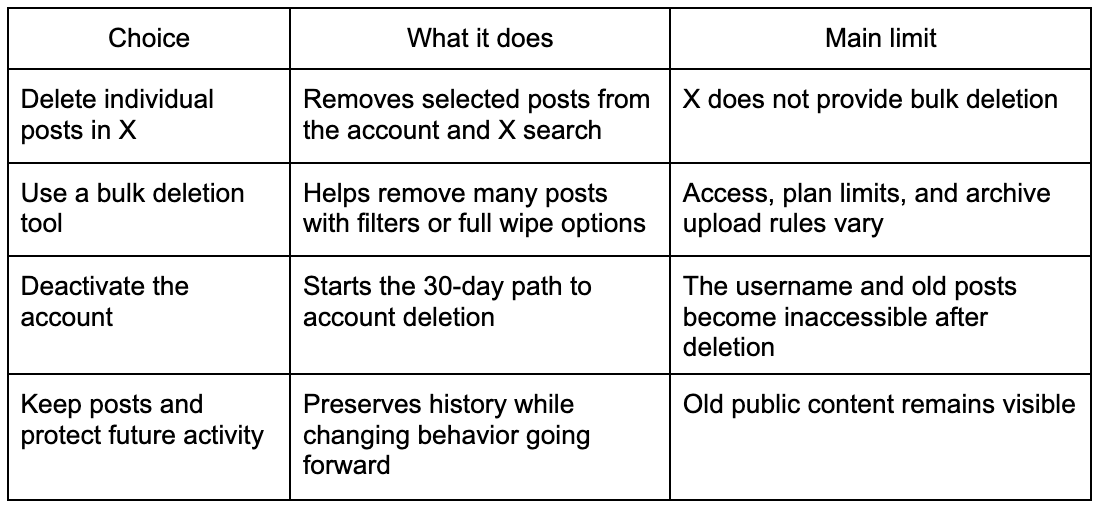
The practical question is whether deletion supports the next use of the account. X says users can delete their own posts at any time, and deleted posts are removed from the user’s account, followers’ timelines, and X search results on X.com and X apps. X also says users cannot delete posts made by other accounts, even when those posts include copied text or commentary about the original post.
A full wipe may suit an account that will stay active under the same handle. Deactivation is a different path. X explains that deactivation starts a 30-day process toward permanent account deletion, while logging back in during that window can restore the account. X also advises users to request their X data before deactivating, since deactivation does not remove data from X systems.
What Deleting Actually Changes
Deleting posts reduces public visibility inside X, but it cannot reach every copy on the internet. X states that cached or cross-posted posts may remain on third-party websites, apps, or search engines, and X cannot remove content outside X.com or its mobile apps. X also notes that reposts with comments from other people remain, because those posts belong to the other accounts.
Before deleting, an account owner should save records that may matter later. X provides a downloadable archive in HTML and JSON files, and that archive can include profile information, posts, Direct Messages, media, follower and following lists, Lists, inferred interest and demographic data, and ad engagement information. X says users can request it through Settings and privacy, then Your account, then Download an archive of your data.
How to Delete a Full Tweet History Safely
The safest first step is an archive request. The user should wait until the archive is ready and stored somewhere accessible before deleting posts. This matters because deleted posts cannot be restored to the timeline through X’s normal post controls. TweetDeleter also states that posts erased through its service cannot be recovered on the timeline, although saved copies may be browsed inside its own service when the user chooses that option.
Next comes the method. X’s own help page says it does not provide a way to bulk-delete posts and that posts can only be deleted manually one by one inside X. For accounts with a small number of posts, manual deletion can be enough. For accounts with years of posts, a bulk tool is usually more realistic.
TweetDeleter presents several useful options for large cleanups. Its feature page says users can connect an X account, select a delete-all option, filter by date range, keywords, or media type, and upload an X archive to reach older posts depending on plan level. The same page says the service can delete selected batches or all posts while keeping the X account itself active.
A careful cleanup can follow this sequence:
- Request and download the X archive before deleting anything.
- Review old posts by date, keywords, media, and replies.
- Decide between selective deletion and full history deletion.
- Save any posts that may have legal, business, personal, or creative value.
- Run the deletion process and check the profile afterward.
- Revoke third-party app access when the cleanup is finished.
That last step is easy to miss. X says connected apps can be reviewed in Apps and sessions, and users can revoke access from that settings area. X also recommends OAuth for third-party app access and warns against giving a username and password directly to an outside app, because that can give the app control of the account.
What to Expect After the Wipe
After a full cleanup, the account may look oddly new while still carrying old social signals. Followers, following, bio, handle, and profile identity may remain if the user deleted posts rather than deactivated the account. That can be useful for a journalist changing beats, a founder preparing for investors, a creator shifting topics, or a private person who wants less old material attached to a searchable name.
Post counts may also take time to look right. TweetDeleter says deleted posts can take time to disappear from the timeline, depending on X API capacity and the number of posts being deleted. Its page also says the visible post count is managed by X, and in some cases count adjustments may lag.
The account owner should also search for the handle in X and in major search engines after cleanup. X states that deleting an X account will not remove information from search engines because X does not control those sites. The same logic applies to old indexed material, screenshots, and copies hosted outside X.
Cleaner Account, Clearer Next Chapter
A full tweet history deletion works best when treated as account maintenance rather than panic cleaning. Useful takeaways are simple: archive first, delete with intention, check what remains outside X, and remove app access afterward. TweetDeleter is a strong option for users who want bulk controls while keeping their X account active, especially when filters and archive-based cleanup matter. X gives account owners control over their own posts, but the wider internet may keep traces that no deletion tool can promise to erase.